Get the right card at checkout, without typing.
- Reads the store name and the order total on supported checkout pages.
- Never reads card numbers, passwords, or anything you type.
- Works on Amazon and Delta today. More sites are added one at a time.
Chrome asks for one permission.
Chrome words every site permission this way, since an extension that can see a page could also change it; min/Max reads the store name and the order total on Amazon checkout pages, and the only thing it adds is its own answer panel.
“Read and change your data on www.amazon.com and www.delta.com”
Compare fixed rates and see what could not be checked.
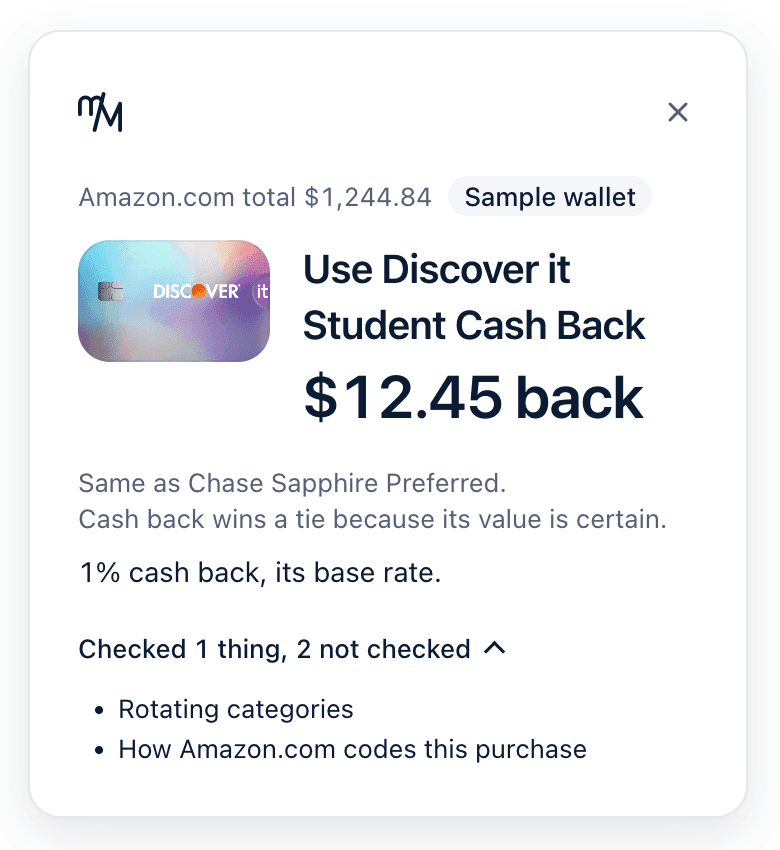
It checks each card's fixed earn rate at the store, says under the answer how it valued points, and lists what it could not check. Open min/Max from the toolbar to replace the sample cards with your own.
Checked
- Each card's fixed earn rate at the store, valued in dollars
Stated under every answer
- How points are valued here, with the cents per point and the source
Not checked yet
- Rotating categories
- Categories you choose
- Spending caps
- Activation
- Conditions on a bonus rate
- How the store codes this purchase
- This store can code as more than one kind of purchase
- What kind of store this is
- A cash value for some cards is not in the catalog yet